486b In praise of Portable Apps
Bij wijze van uitzondering de vorige blog over Portable Apps ook in verkorte vorm in het Engels zodat iemand als John Haller en zijn medewerkers dit ook kunnen lezen. De vertaling is puur het werk van ChatGPT, ik doe dat echt niet beter.
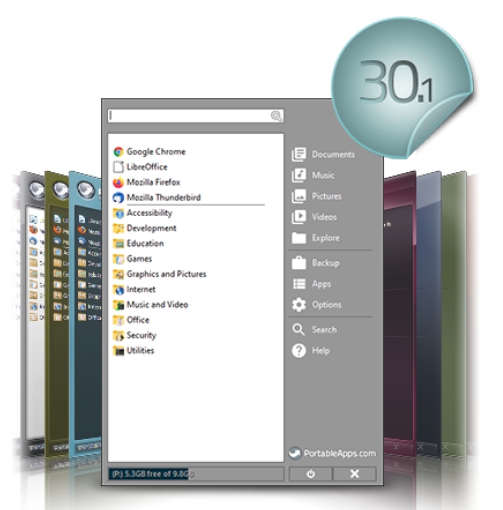
I would like to make a case for PortableApps.com, an initiative started by John Haller. Over the years it has grown into a solid community project: freeware, largely open source, quietly maintained, and refreshingly free of ads or hype.
The idea is simple. You can run your applications directly from a USB stick (or any folder), including your settings, preferences, bookmarks and workflows. You plug it in, work on your own software environment — at work, at a friend’s place, or on a random computer — and unplug it again without leaving traces behind. That is still the core intention today.
Why I rediscovered it
I recently came back to Portable Apps during my forced transition from Windows 10 to Windows 11. Not because I oppose progress or new hardware, but because my old system still worked perfectly and had been carefully shaped over many years. Migrating to a new setup is time-consuming; it can easily take months before everything feels “right” again.
My current solution is simple system hygiene:
- Keep the C: drive minimal — operating system only.
- Store all data and portable apps on a D: drive, neatly organised.
If the system crashes or you switch machines, the transition becomes trivial. The D: drive remains usable, all applications and settings come with you, and the operating system can be reinstalled without drama. The result is a clean system: no scattered files, no registry clutter, no hidden leftovers. Updates are also straightforward, because everything lives in one place.
What Portable Apps really solves
Formally, Portable Apps is about software that does not need installation. In practice, it is about something deeper:
- Ownership — your tools, your settings, your routines
- Separation of concerns — OS ≠ data ≠ applications
- Low migration costs — crashes and upgrades become manageable
- Mental clarity — one folder, one logic, no digital crumbs
This is classic systems thinking. Windows never truly embraced it; historically it prioritised system control over user control. Portable Apps flips that logic.
Why it feels right (and why Windows doesn’t)
Mobile phones seem to do migration better: put two phones next to each other and everything transfers automatically. But what really moves are accounts, cloud data and vendor dependencies. Your habits, shortcuts and frictions resurface weeks later.
Portable Apps migrates behaviour, not just data — and that makes a real difference.
“There is no such thing as a free lunch”
So what’s the catch?
PortableApps.com runs on donations, optional sponsorships, volunteers and extremely low overhead. It is fragile, but also remarkably stable. There is no free lunch — but there is simple, modest food.
The platform deliberately avoids cloud sync, AI features, collaboration layers and ecosystem lock-in. That is not a weakness; it is a choice. By doing one thing well, it remains sustainable.
Large tech companies have no incentive to copy this model. Portable Apps reduces lock-in, avoids licensing traps and makes migration painless — all things that undermine platform power.
The future
Portable Apps will likely survive as long as:
- Windows continues to support classic desktop software
- there remains a niche of power users, minimalists and system-minded people
It will not see mass adoption, OS-level integration or commercial scaling — and that is precisely why it endures.
The real risk is not funding, but relevance erosion:
- more web-apps
- more account-bound software
- more DRM and cloud dependencies
Portable Apps works best in a stand-alone software world. That world is shrinking, but it is not disappearing.
What this is really about
This is not a plea for software. It is a plea for an architectural principle:
My digital life is not identical to my operating system.
That idea may sound old-fashioned. But like local music libraries or self-hosted email, it does not vanish — it moves to people who consciously choose it.
Closing
Portable Apps is not a free lunch.
It is a home-cooked meal:
- simple
- nourishing
- not Instagram-worthy
- but you know exactly what’s in it
And in an age of bundled ecosystems and subscription logic, that may be precisely why it still tastes so good.
